Teams and rosters
Each team has its own page, listed on the Teams page. A team page shows the coaches, training times, home venue, the roster, the team's fixtures and its league table.
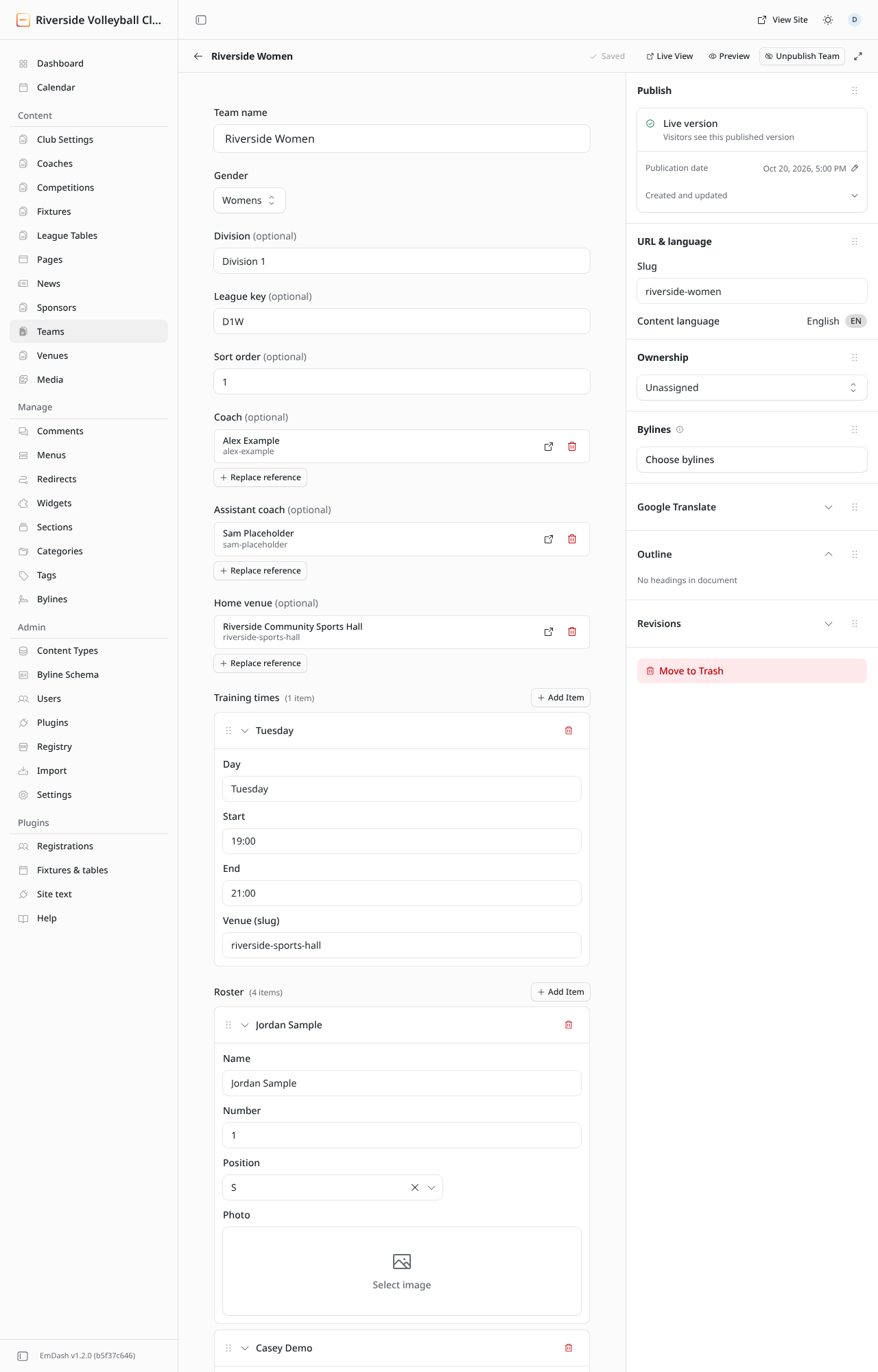
Team fields
| Field | What to put in it |
|---|---|
| Team name | E.g. "Riverside Women". |
| Gender | Mens, Womens, Mixed or Junior. Used to group and label teams. |
| Division | The league or division, e.g. "Division 1". Shown on the team's card. |
| League key | The short code of the team's league table, e.g. D1W. It links the team to its table: see League keys. Leave empty if the team isn't in a league. |
| Sort order | Teams are listed lowest number first. Use 1, 2, 3… |
| Coach / Assistant coach | Pick from your coaches. Click Replace reference to change one. |
| Home venue | Pick from your venues. |
| Training times | One row per session (see below). |
| Roster | One row per player (see below). |
| Body | Anything else about the team: what level it plays at, how to join. |
Training times
Click Add Item for each session and fill in:
- Day: e.g.
Tuesday. - Start and End: 24-hour times, e.g.
19:00and21:00. - Venue (slug): the venue's slug, e.g.
riverside-sports-hall. Find it in the venue's URL & language panel. Leave it empty if it's the home venue.
The first session shows on the team's card on the Teams page ("Trains Tuesday 19:00").
The roster
Click Add Item for each player and fill in Name, Number and Position (OH outside hitter, MB middle blocker, OPP opposite, S setter, L libero, DS defensive specialist). A Photo is optional.
- Click a player's name bar to fold or unfold the row.
- The bin on the right removes a player.
- Drag the handle to change the order.
warning
Rosters are public. Only list players who have agreed to it, and only add photos with permission. For under-18s, follow your club's safeguarding policy.
Remember to Publish changes when you're done.